
Email notifications are still one of the simplest and most reliable ways to keep users informed in many applications.
For lightweight scenarios—such as alerts, confirmations, or internal notifications—using an SMTP server can be a practical and cost-effective solution.
In this article, we focus primarily on configuring and using Google App Passwords, and then briefly demonstrate how to send an email from a .NET application using Gmail’s SMTP server.
While Gmail is used as the example, the same concept applies to most SMTP providers.
Step 1: Create an App Password
- Go to https://myaccount.google.com/apppasswords
- Sign in with your Google account username and password.
- You will see this page. Choose a name for your app (e.g., “MY APP”) and click on “Generate.”
- Copy the password that’s shown.
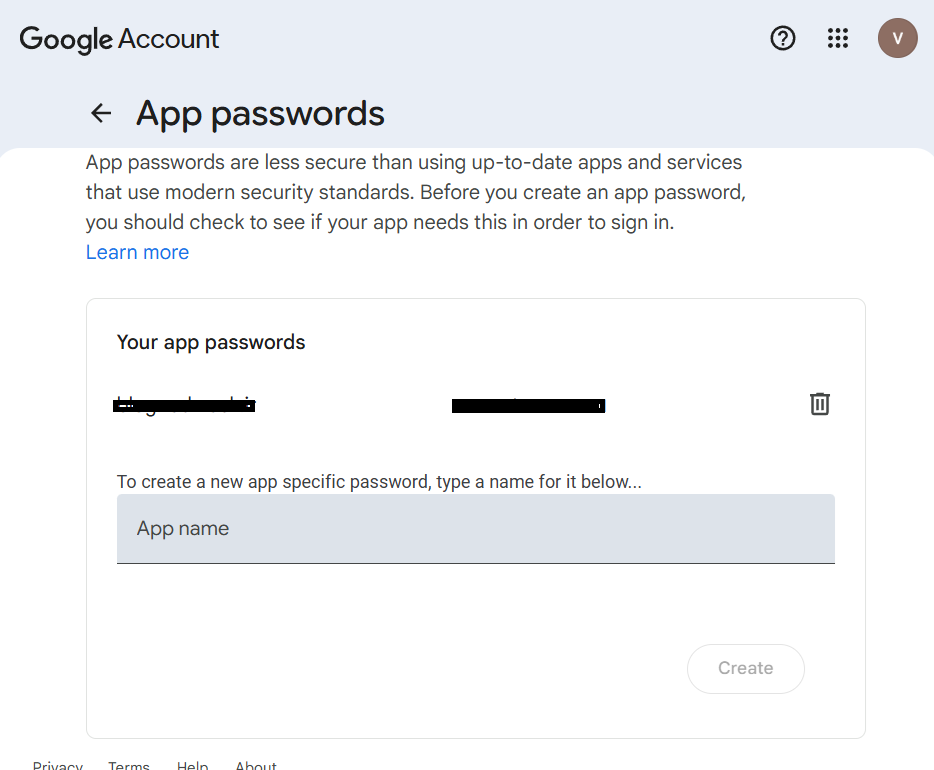
Step 2: Use the App Password in Your Code
Now that you have generated the App Password, you can use it in your C# code for SMTP authentication.
var fromAddress = new MailAddress("from_address@gmail.com", "From Name");
var toAddress = new MailAddress("to_address@gmail.com", "To Name");
const string fromPassword = "password from myaccount.google.com";
const string subject = "Subject";
const string body = "Body";


var smtp = new SmtpClient
{
    Host = "smtp.gmail.com",
    Port = 587,
    EnableSsl = true,
    DeliveryMethod = SmtpDeliveryMethod.Network,
    UseDefaultCredentials = false,
    Credentials = new System.Net.NetworkCredential(fromAddress.Address, fromPassword)
};


using var message = new MailMessage(fromAddress, toAddress)
{
    Subject = subject,
    Body = body
};
smtp.Send(message);
Additional Notes
- App Passwords:
If 2-Step Verification is enabled on your Google account, you must generate an App Password as shown above. This password replaces your normal Google account password for SMTP access. - SMTP Port and Settings:
Gmail SMTP uses port 587 with SSL/TLS enabled. If you are using a different email provider, make sure to verify their SMTP server address, port, and security requirements.
💡 Important Note
It is not recommended to use the SmtpClient class for new development, as it does not support many modern email protocols and features.
For production or long-term solutions, consider using MailKit or other modern email libraries instead.