Orleans is a cross-platform software framework for building cloud-native apps , scalable and robust distributed interactive applications based on the .NET
Actor Model:
Orleans is based on the actor model, where each actor is a lightweight, concurrent, immutable object that encapsulates a piece of state and corresponding behavior. Actors communicate exclusively with each other using asynchronous messages.
Virtual Actors:
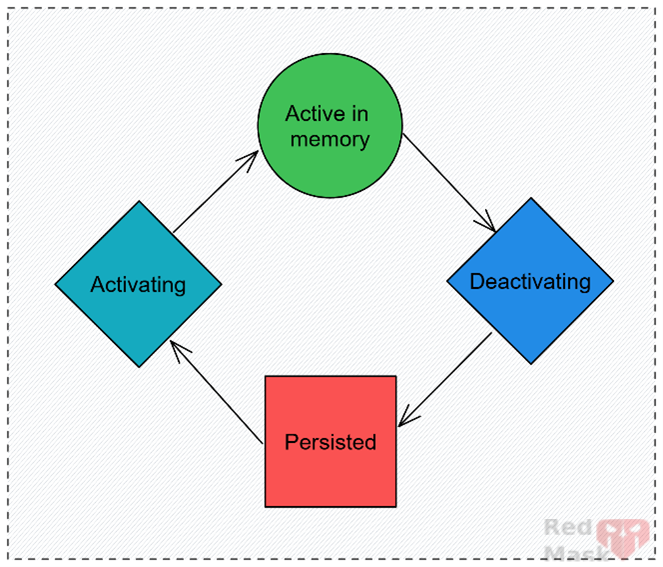
Orleans introduced the concept of virtual actors, where actors exist perpetually and are always addressable. This approach simplifies the development of distributed applications by eliminating the need to manage actor lifecycles explicitly.
Features :
- Elastic Scalability: Orleans is designed to scale elastically. When a host joins a cluster, it can accept new activations. When a host leaves the cluster, the previous activations on that host will be reactivated on the remaining hosts as needed.
- Fault Tolerance: The capability of Orleans to detect and recover from failures automatically. The same properties that enable elastic scalability also enable fault tolerance. The cluster automatically detects and quickly recovers from failures.
- Distributed Applications: Orleans simplifies the complexities of distributed application development by providing a common set of patterns and APIs. It enables developers familiar with single-server application development to transition to building resilient, scalable cloud-native services and distributed applications.
- Cross-Platform: Orleans runs anywhere that .NET is supported, including Linux, Windows, and macOS. Applications can be deployed to Kubernetes, virtual machines, and PaaS services such as Azure App Service and Azure Container Apps.
- Orleans Clusters: Groups of silos that work together to provide a scalable and fault-tolerant environment for grains.
- Hosting Options: Various options for hosting Orleans applications, such as Kubernetes, Azure App Service, and virtual machines.
- Observability: Features for monitoring and troubleshooting Orleans applications, including logging, metrics, and tracing.
Concepts :
Grains:
Virtual actors in Orleans. They are the fundamental building blocks, representing entities with identity, behavior, and state.
Grains in Orleans each have a single, unique, user-defined identifier which consists of two parts:
- The grain type name, which uniquely identifies the grain class.
- The grain key, which uniquely identifies a logical instance of that grain class.
The grain type and key are both represented as human-readable strings in Orleans and, by convention, the grain identity is written with the grain type and key separated by a / character. For example, shoppingcart/bob65 represents the grain type named shoppingcart with a key bob65.
- IGrainWithGuidKey: Marker interface for grains with Guid keys.
- IGrainWithIntegerKey: Marker interface for grains with Int64 keys.
- IGrainWithStringKey: Marker interface for grains with string keys.
- IGrainWithGuidCompoundKey: Marker interface for grains with compound keys.
- IGrainWithIntegerCompoundKey: Marker interface for grains with compound keys.
using Orleans.CodeGeneration;
using Orleans.Runtime;
using Orleans;
using System.Threading.Tasks;

public interface IMyFirstGrain : IGrainWithStringKey
{
    Task SetUrl(string fullUrl);
    Task<string> GetUrl();
}

public sealed class MyFirstGrain: Grain, IMyFirstGrain
{
    public async Task SetUrl(string str)
    {
    }
    public Task<string> GetUrl() {
    }
}
using Orleans.CodeGeneration;
using Orleans.Runtime;
using Orleans;
using System.Threading.Tasks;

public interface IMyFirstGrain : IGrainWithStringKey
{
    Task SetUrl(string fullUrl);
    Task<string> GetUrl();
}

public sealed class MyFirstGrain: Grain, IMyFirstGrain
{
    public async Task SetUrl(string str)
    {

    }

    public Task<string> GetUrl() {
    }
}
Silos:
Runtime containers for grains. They manage the lifecycle of grains, handle communication, and provide fault tolerance and scalability. different hosting options, such as Kubernetes, Azure App Service, and virtual machines.
using Microsoft.AspNetCore.Builder;
using Orleans.Runtime;

var builder = WebApplication.CreateBuilder(args);

builder.Host.UseOrleans(static siloBuilder =>
{
   siloBuilder
      .UseLocalhostClustering();
      .ConfigureEndpoints(endpointAddress, siloPort, gatewayPort)
      .Configure<ClusterOptions>(options =>
             {
                 options.ClusterId = context.Configuration["ORLEANS_CLUSTER_ID"];
                 options.ServiceId = nameof(ShoppingCartService);
             })
       ////-------------persist ------------------------
       //.AddMemoryGrainStorage("urls");
       //.AddRedisGrainStorage("urls", optionsBuilder => optionsBuilder.Configure(options =>
       //{
                // options.DataConnectionString = "localhost:6379"; // This is the deafult
                // options.UseJson = true;
                // options.DatabaseNumber = 1;
       //}))
       .AddAdoNetGrainStorage("urls ", x =>  {
             x.ConnectionString = "Data Source=.;Initial Catalog=orl1;Integrated Security=true;TrustServerCertificate=True;";
             x.Invariant = "System.Data.SqlClient";
       })

      ////-------------persist reminders------------------------
//.UseInMemoryReminderService()                               //.UseAzureTableReminderService(connectionString)//Microsoft.Orleans.Reminders.AzureStorage
        .UseAdoNetReminderService(options =>            //Microsoft.Orleans.Reminders.AdoNet
        {
            options.ConnectionString = connectionString;
            options.Invariant = invariant;
        })

});

using var app = builder.Build();

Grain Placement:
Strategies for deciding where to activate grains, including random, local, hash-based, and activation-count-based
[SamplePlacementStrategy]
public class MyGrain : Grain, IMyGrain
{
    ...
}

[HashBasedPlacement] , [StatelessWorker] , [PreferLocalPlacement] , [ActivationCountBasedPlacement]
👉Grains marked with [StatelessWorker] are not registered in the grain directory and can be placed on any available silo, which is suitable for tasks that don't require state.
Grain Persistence:
Mechanisms for persisting grain state, including storage providers and state management. different placement strategies,
using Orleans.Runtime;
using System.Threading.Tasks;

[Serializable]
public class ProfileState
{
    public string Name { get; set; }

    public Date DateOfBirth { get; set; }
}

[GenerateSerializer] // Required for Orleans serialization
public class CartState
{
    [Id(0)] public int Value { get; set; } = 0;
}

public interface IUserGrain: IGrainWithIntegerKey
{
    Task Increment();
    Task<int> GetCount();
}

public class UserGrain : Grain, IUserGrain
{
    private readonly IPersistentState<ProfileState> _profile;
    private readonly IPersistentState<CartState> _cart;

    public UserGrain(
        [PersistentState("profile", "profileStore")] IPersistentState<ProfileState> profile,
        [PersistentState("cart", "cartStore")] IPersistentState<CartState> cart)
    {
        _profile = profile;
        _cart = cart;
    }

    //Read state
    public Task<string> GetNameAsync() => Task.FromResult(_profile.State.Name);

    //Write state
    public async Task SetNameAsync(string name)
    {
         _profile.State.Name = name;
         await _profile.WriteStateAsync();
    }
}
Before a grain can use persistence, you must configure a storage provider on the silo.
using IHost host = new HostBuilder()
    .UseOrleans(siloBuilder =>
    {
        siloBuilder.AddAzureTableGrainStorage(
            name: "profileStore",
            configureOptions: options =>
            {
                // Configure the storage connection key
                options.ConfigureTableServiceClient(
                    "DefaultEndpointsProtocol=https;AccountName=data1;AccountKey=SOMETHING1");
            })
            .AddAzureBlobGrainStorage(
                name: "cartStore",
                configureOptions: options =>
                {
                    // Configure the storage connection key
                    options.ConfigureTableServiceClient(
                        "DefaultEndpointsProtocol=https;AccountName=data2;AccountKey=SOMETHING2");
                });
    })
    .Build();
Grain Observers:
Mechanisms for grains to notify clients or other grains about state changes or events.
public interface IChat : IGrainObserver
{
    void ReceiveMessage(string message);
}

public class Chat : IChat
{
    public void ReceiveMessage(string message)
    {
        Console.WriteLine(message);
    }
}
class HelloGrain : Grain, IHello
{
    private ObserverSubscriptionManager<IChat> _subsManager;

    public override async Task OnActivateAsync()
    {
        // We created the utility at activation time.
        _subsManager = new ObserverSubscriptionManager<IChat>();
        await base.OnActivateAsync();
    }

    // Clients call this to subscribe.
    public Task Subscribe(IChat observer)
    {
        if (!_subsManager.IsSubscribed(observer))
        {
            _subsManager.Subscribe(observer);
        }
        return Task.CompletedTask;
    }

    //Also clients use this to unsubscribe themselves to no longer receive the messages.
    public Task UnSubscribe(IChat observer)
    {
        if (_subsManager.IsSubscribed(observer))
        {
            _subsManager.Unsubscribe(observer);
        }
        return Task.CompletedTask;
    }
}
Grain Services:
A GrainService is a special grain: it has no stable identity and runs in every silo from startup to shutdown.
public interface IDataService : IGrainService
{
    Task MyMethod();
}

[Reentrant]
public class DataService : GrainService, IDataService
{
    readonly IGrainFactory _grainFactory;

    public DataService(
        IServiceProvider services,
        GrainId id,
        Silo silo,
        ILoggerFactory loggerFactory,
        IGrainFactory grainFactory)
        : base(id, silo, loggerFactory)
    {
        _grainFactory = grainFactory;
    }

    public override Task Init(IServiceProvider serviceProvider) =>
        base.Init(serviceProvider);

    public override Task Start() => base.Start();

    public override Task Stop() => base.Stop();

    public Task MyMethod()
    {
        // TODO: custom logic here.
        return Task.CompletedTask;
    }
}
👉 GrainServiceClient<TGrainService>GrainServiceClient that other grains will use to connect to the GrainService.
public interface IDataServiceClient : IGrainServiceClient<IDataService>, IDataService
{
}
public class DataServiceClient : GrainServiceClient<IDataService>, IDataServiceClient
{
    public DataServiceClient(IServiceProvider serviceProvider)
        : base(serviceProvider)
    {
    }

    // For convenience when implementing methods, you can define a property which gets the IDataService
    // corresponding to the grain which is calling the DataServiceClient.
    private IDataService GrainService => GetGrainService(CurrentGrainReference.GrainId);

    public Task MyMethod() => GrainService.MyMethod();
}
//Configure the grain service and grain service client in the silo.

(ISiloHostBuilder builder) =>  builder.ConfigureServices(x=> x.AddGrainService<DataService>()
                                                                    .AddSingleton<IDataServiceClient, DataServiceClient>());
//Inject the grain service client into the other grains

public class MyNormalGrain: Grain<NormalGrainState>, INormalGrain
{
    readonly IDataServiceClient _dataServiceClient;

    public MyNormalGrain(IGrainActivationContext grainActivationContext,
                         IDataServiceClient dataServiceClient) =>_dataServiceClient = dataServiceClient;
}
Streams:
Orleans Streams provide a way for grains to communicate asynchronously with each other and external systems. They are a key feature for building event-driven and reactive applications.
-
- Components: Streams consist of stream providers, stream namespaces, and stream subscribers. Stream providers manage the delivery of messages, while namespaces organize streams. Grains or other components can subscribe to streams to receive messages.
- Usage: Streams are useful for scenarios like real-time data processing, event sourcing, and integrating with message brokers (e.g., Azure Event Hubs, Apache Kafka).
dotnet add package Microsoft.Orleans.Server
dotnet add package Microsoft.Orleans.Streaming
Silo .AddMemoryStreams("StreamProvider") .AddMemoryGrainStorage("PubSubStore");using Orleans; using System.Threading.Tasks; public interface IMessagePublisherGrain : IGrainWithGuidKey { Task SendMessage(string message); }using Orleans; using System.Threading.Tasks; public interface IMessageSubscriberGrain : IGrainWithGuidKey { Task StartConsuming(); }Producer:
public interface IFleetPreAssignmentStateKafkaStreamingGrain : IGrainWithGuidKey
{
     Task PublishAsync(List<StateKafkaStreamDto> StateKafkaDtos);
}


public class StateKafkaStreamingGrain : StatelessGrainBase, IStateKafkaStreamingGrain
{
    private readonly IStateLogGrain _StateLogGrain;

    public StateKafkaStreamingGrain(IStateLogGrain StateLogGrain)
    {
        _StateLogGrain = StateLogGrain;
    }

    public async Task PublishAsync(List<StateKafkaStreamDto> StateKafkaDtos)
    {
        var provider = this.GetStreamProvider(("MemoryStreamProvider");
        var stream = provider.GetStream<StateKafkaStreamDto>(StreamId.Create("This_is_NameSpace", this.GetPrimaryKey()));

            await stream.OnNextBatchAsync(StateKafkaDtos);
    }
}
Implecit subscribers:
[ImplicitStreamSubscription("This_is_NameSpace")]
public class MessageSubscriberGrain : Grain, IMessageSubscriberGrain
{
    private StreamSubscriptionHandle<StateKafkaStreamDto> _subscription;

    public async Task StartConsuming()
    {
        var streamProvider = this.GetStreamProvider("MemoryStreamProvider");
        var stream = provider.GetStream<StateKafkaStreamDto>(StreamId.Create("This_is_NameSpace", this.GetPrimaryKey()));
        // Set our OnNext method to the lambda which simply prints the data.
        // This doesn't make new subscriptions, because we are using implicit
        // subscriptions via [ImplicitStreamSubscription].
        _subscription=await stream.SubscribeAsync<StateKafkaStreamDto>(
            async (data, token) =>
            {
                Console.WriteLine(data);
                await Task.CompletedTask;
            });
    }
}
Timers:
Timers in Orleans allow grains to schedule periodic tasks. They are useful for scenarios where grains need to perform actions at regular intervals.
-
- Usage: Timers can be used to perform periodic state updates, data synchronization, and other recurring tasks.
- Example: A grain might use a timer to periodically fetch and process new data from an external source.
public class TimerGrain(
             [PersistentState("timer", "fileStore")] IPersistentState<TimerGrainState> state,
             ILogger<TimerGrain> logger) : Grain
{
    private IGrainTimer? _timer;

    public override async Task OnActivateAsync(CancellationToken ct)
    {

        //grain timers do not survive deactivation — they stop working as soon as the grain is deactivated,
        //regardless of whether you implement ITimerGrain or not.
        _timer = this.RegisterGrainTimer(
            callback:  async (stat, cancellationToken) =>
            {
                // Omitted for brevity...
                // Use state
                Console.Write($"Timer fired for grain: {state.State.Count}");

                await Task.CompletedTask;
            },
            state: this,
            options: new GrainTimerCreationOptions
            {
                DueTime = TimeSpan.FromSeconds(3),
                Period = TimeSpan.FromSeconds(10)
            });

        await base.OnActivateAsync(ct);
    }

    public async Task IncrementAsync()
    {
        state.State.Count++;
        await state.WriteStateAsync();
    }

    public Task<int> GetCountAsync() => Task.FromResult(state.State.Count);


    public override Task OnDeactivateAsync(DeactivationReason reason, CancellationToken ct)
    {
        _timer?.Dispose();
        return base.OnDeactivateAsync(reason, cancellationToken);
    }
}

public class TimerGrainState
{
    public int Count { get; set; }
}
Reminders:
Reminders are similar to timers, but they are persistent and survive grain deactivation and silo restarts. They are useful for scheduling one-time or recurring tasks that need to be executed even if the grain is not currently active.
-
- Usage: Reminders can be used to perform tasks like sending notifications, triggering events, or performing maintenance activities.
- Example: A grain might use a reminder to send a daily report at a specific time.
Orleans Reminders — Basics
- Orleans reminders are persistent, reliable timers that activate grain methods at scheduled intervals.
- They are backed by a reminder storage provider (usually a reliable external storage like Azure Table Storage, SQL Server, or Redis).
- Reminders survive grain deactivation and even silo restarts because they are stored externally.
- When a reminder fires, the Orleans runtime activates the grain (if not active) and calls the grain’s reminder callback.
What happens to Orleans reminders on app restart?
- Since reminders are stored persistently, they continue to exist even if your app (Orleans silo) restarts.
- On silo restart, Orleans will re-register all reminders from storage.
- Grains will be activated on demand when reminders fire.
- You don’t need to recreate reminders after restart — they are durable.
Implications for your scenario (app restart on config change):
- Restarting your app (Orleans silo) will not lose scheduled reminders.
- The reminders will keep firing as configured after the silo is back online.
- So, restarting the app to pick up config changes won't disrupt your reminders.
Example:

public interface IMyGrain : IGrainWithGuidKey
{
    Task StartReminder();
}

public class MyGrain : Grain, IMyGrain, IRemindable
{
    private IGrainReminder _reminder;

   //Reminder won't start until you call StartReminder()
    public async Task StartReminder()
    {
        _reminder = await this.RegisterOrUpdateReminder(  "MyReminder",
TimeSpan.FromMinutes(1),
TimeSpan.FromMinutes(5));
    }
    //or in OnActivateAsync
    public override async Task OnActivateAsync(CancellationToken cancellationToken)
    {
        _reminder = await this.RegisterOrUpdateReminder(  "MyReminder",
TimeSpan.FromMinutes(1),
TimeSpan.FromMinutes(5));

        await base.OnActivateAsync(cancellationToken);
    }


    public async Task ReceiveReminder(string reminderName, TickStatus status)
    {
        if (reminderName == "MyReminder")
        {
            // Reminder fired - do your work here
            Console.WriteLine($"Reminder fired at {DateTime.UtcNow}");
        }
    }

   //Often, you don’t unregister in OnDeactivateAsync if you want the reminder to persist — it depends on your scenario.
    public override Task OnDeactivateAsync(DeactivationReason reason, CancellationToken ct)
    {
        this.UnregisterReminder(_reminder);
        return base.OnDeactivateAsync(reason, ct);
    }
}
Example2 :multiple reminder : (NOT Preferred in most Orleans designs)
public class MyMultipleReminderGrain : Grain, IRemindable
{
    private IGrainReminder _reminder1;
    private IGrainReminder _reminder2;

    public override async Task OnActivateAsync(CancellationToken ct)
    {
        _reminder1 = await this.RegisterOrUpdateReminder("Reminder1",
TimeSpan.FromMinutes(1),
TimeSpan.FromMinutes(5));
        _reminder2 = await this.RegisterOrUpdateReminder("Reminder2",
TimeSpan.FromSeconds(30),
TimeSpan.FromMinutes(10));
        await base.OnActivateAsync(ct);
    }

    public async Task ReceiveReminder(string reminderName, TickStatus status)
    {
        if (reminderName == "Reminder1")
        {
            // Do task for Reminder1
        }
        else if (reminderName == "Reminder2")
        {
            // Do task for Reminder2
        }
    }
}
Transactions:
Support for distributed transactions to ensure consistency across multiple grains.
Serialization:
There are broadly two kinds of serialization used in Orleans:
- Grain call serialization - used to serialize objects passed to and from grains.
- Grain storage serialization - used to serialize objects to and from storage systems.
[GenerateSerializer]
public class Publication
{
    [Id(0)]
    public string Title { get; set; }

    [Id(1)]
    public string ISBN { get; set; }
}
Serialization best practices
- ✅Do give your types aliases using the [Alias("my-type")] attribute. Types with aliases can be renamed without breaking compatibility.
- ❌Do not change a record to a regular class or vice-versa. Records and classes are not represented in an identical fashion since records have primary constructor members in addition to regular members and therefore the two are not interchangeable.
- ❌Do not add new types to an existing type hierarchy for a serializable type. You must not add a new base class to an existing type. You can safely add a new subclass to an existing type.
- ✅Do replace usages of SerializableAttribute with GenerateSerializerAttribute and corresponding IdAttribute
- ✅Do start all member ids at zero for each type. Ids in a subclass and its base class can safely overlap. Both properties in the following example have ids equal to 0.
IGrainFactory vs IClusterClient :
Both IGrainFactory and IClusterClient let you get grain references, but they serve slightly different purposes and contexts. Here’s a quick breakdown
IGrainFactory
-
- The core grain activation factory interface.
- Used inside grains and inside the silo to get grain references.
- Lightweight interface that simply returns grain references.
- Available in grain implementations, silo host, and client.
- Methods: GetGrain<T>(id), etc.
- No connection management or lifecycle — just a factory.
IClusterClient
-
- Represents the client-side connection to the Orleans cluster.
- Implements IGrainFactory (inherits from it), so you can get grains from it too.
- Provides cluster management features: connect/disconnect, cluster membership, retries.
- Used by external clients (console apps, ASP.NET Core apps, etc.) to interact with the cluster.
- Manages the network connection, retries, serialization, and so forth.
-
Scenario
Use
Inside grain code or silo host services
IGrainFactory
External app or client connecting to cluster
IClusterClient
The idle timeout of grains
in Orleans determines how long a grain stays activated (in memory) after its last use before Orleans deactivates it to free resources.
What is Idle Timeout?
-
- It’s the duration a grain remains inactive (no method calls) before being automatically deactivated by Orleans.
- Once the idle timeout expires, Orleans calls OnDeactivateAsync on the grain and removes it from memory.
- This mechanism helps scale and conserve resources by unloading grains that aren’t in use.
Default Idle Timeout
-
- By default, Orleans sets the idle timeout to 2 hours (120 minutes).
- This value can be configured globally or per-grain.
How to configure Idle Timeout?
You configure idle timeout in the grain collection options at silo setup, for example:
.UseOrleans(builder =>
{
    builder.Configure<GrainCollectionOptions>(options =>
    {
        options.CollectionAge = TimeSpan.FromMinutes(30); // 30 minutes idle timeout
    });
});
Or if you want to configure it per grain type (available in newer Orleans versions):
|
|
How idle timeout affects grain timers?
-
- When a grain deactivates (due to idle timeout), all grain timers stop.
- When the grain is accessed again, it activates anew and timers must be re-registered (usually in OnActivateAsync).
The Actor Model
The Actor Model is a conceptual model for concurrent computation that treats "actors" as the universal primitives of concurrent computation. It was proposed by Carl Hewitt in 1973.
Core Concepts
- Everything is an Actor: Similar to how object-oriented programming views "everything as an object," the Actor Model states that every computational unit is an actor.
- Encapsulation: An actor encapsulates its own state and behavior. This state is private to the actor and can only be modified by the actor itself.
- Asynchronous Message Passing: Actors communicate exclusively by sending and receiving asynchronous messages. There is no direct method invocation or shared memory between actors. This is a fundamental difference from traditional object-oriented programming.
- Fire and Forget: An actor sends a message and doesn't necessarily expect a response.
- Request-Response: An actor sends a message and expects a reply from the recipient.
- Isolation and Independence: Each actor is independent and isolated. This makes them inherently concurrent and easier to reason about, as their internal state cannot be directly interfered with by other actors.
- Local Decision Making: In response to a message, an actor can concurrently:
- Send a finite number of messages to other actors.
- Create a finite number of new actors.
- Designate the behavior to be used for the next message it receives (effectively changing its internal state or behavior).
- Location Transparency: The sender of a message doesn't need to know where the receiving actor is physically located (e.g., on the same machine, on a different server). The message delivery mechanism handles this.
- No Shared State: This is a crucial principle. Because actors communicate only via messages, they don't share memory, eliminating common concurrency issues like deadlocks and race conditions.
Benefits of the Actor Model
- Concurrency and Parallelism: Naturally supports highly concurrent and parallel systems.
- Scalability: Due to isolation and message passing, systems built with the Actor Model can easily scale out across multiple cores, machines, or even data centers.
- Fault Tolerance and Resilience: The isolation of actors helps in building fault-tolerant systems. If one actor fails, it doesn't directly corrupt the state of other actors. Frameworks built on the Actor Model often provide supervision mechanisms to handle actor failures.
- Simplified Concurrency Management: Developers can focus on the logic of individual actors without worrying about low-level threading primitives like locks or semaphores.
- Distribution: The message-passing nature and location transparency make it well-suited for distributed systems.
When to Use the Actor Model
The Actor Model is particularly well-suited for:
- Highly concurrent applications: E-commerce shopping carts, real-time gaming, chat applications, financial trading systems.
- Distributed systems: Microservices architectures, IoT data processing.
- Workflow processes: Complex systems with a series of steps that need to run at scale.
- Data streaming: Applications that emit and consume continuous streams of data.
When Not to Use the Actor Model
It's not a one-size-fits-all solution. For simpler, single-threaded applications or those that don't require high concurrency or distribution, the overhead of an actor-based system might be unnecessary.
Microsoft Orleans
Microsoft Orleans is a cross-platform framework for building distributed, high-scale applications with .NET. It's an implementation of the Actor Model, notably introducing the concept of "Virtual Actors." Orleans simplifies the complexities of distributed system development by extending familiar C# concepts to multi-server environments.
Key Concepts of Microsoft Orleans
- Grains (Virtual Actors):
- Core Building Block: Grains are the fundamental computational units in Orleans, analogous to actors in the Actor Model.
- Stateful and Behavioral: Each grain encapsulates its own state and behavior.
- Virtual Actors: This is a key innovation of Orleans. Grains "exist" perpetually, even if they are not currently activated in memory. When a message is sent to a grain, Orleans automatically activates it (if not already active) on a suitable server (silo) and processes the message. When a grain is idle for a period, Orleans can automatically deactivate it to conserve resources. This "virtual" nature means developers don't need to manually manage the lifecycle of grains.
- Single-threaded execution: Each grain instance processes messages one at a time, ensuring that its internal state is not accessed concurrently. This eliminates the need for locks or other synchronization primitives within a grain's code.
- Grain Identity: Each grain has a unique, user-defined identifier (a grain type name and a grain key).
- Grain References: Instead of direct object references, you interact with grains via "grain references," which are logical handles to a grain's identity.
Code Sample (Grain Interface and Implementation):
// 1. Define a Grain Interface
// This interface defines the public methods that can be called on the grain.
// It must inherit from IGrainWithGuidKey, IGrainWithIntegerKey, IGrainWithStringKey, etc.,
// to specify the type of its primary key.
public interface IHelloWorldGrain : IGrainWithIntegerKey
{
    Task<string> SayHello(string name);
    Task IncrementCounter();
    Task<int> GetCounter();
}


// 2. Implement the Grain Class
// The grain class implements the interface and inherits from Orleans.Grain.
public class HelloWorldGrain : Grain, IHelloWorldGrain
{
    // Grains can have persistent state. Here, we'll store a simple counter.
    // We'll see how to make this state persistent later.
    private int _counter = 0;

    public Task<string> SayHello(string name)
    {
        Console.WriteLine($"HelloWorldGrain {this.GetPrimaryKeyLong()} received SayHello from {name}");
        return Task.FromResult($"Hello, {name} from grain {this.GetPrimaryKeyLong()}!");
    }

    public Task IncrementCounter()
    {
        _counter++;
        Console.WriteLine($"Grain {this.GetPrimaryKeyLong()} counter incremented to {_counter}");
        return Task.CompletedTask;
    }

    public Task<int> GetCounter()
    {
        Console.WriteLine($"Grain {this.GetPrimaryKeyLong()} returning counter: {_counter}");
        return Task.FromResult(_counter);
    }

    // Optional: OnActivateAsync is called when the grain is activated.
    public override Task OnActivateAsync(CancellationToken cancellationToken)
    {
        Console.WriteLine($"HelloWorldGrain {this.GetPrimaryKeyLong()} activated!");
        return base.OnActivateAsync(cancellationToken);
    }

    // Optional: OnDeactivateAsync is called when the grain is deactivated (idle).
    public override Task OnDeactivateAsync(DeactivationReason reason, CancellationToken cancellationToken)
    {
        Console.WriteLine($"HelloWorldGrain {this.GetPrimaryKeyLong()} deactivated!");
        return base.OnDeactivateAsync(reason, cancellationToken);
    }
}
- Silos:
- Grain Hosts: A silo is a process that hosts and executes grains. It's the runtime environment for Orleans applications.
- Clustering: Multiple silos form an Orleans cluster. The cluster automatically manages the distribution and activation of grains across available silos.
- Elastic Scalability and Fault Tolerance: Silos can be added or removed dynamically. If a silo fails, Orleans automatically reactivates the grains previously hosted on that silo on other healthy silos.
Code Sample (Silo Host):
using Microsoft.Extensions.Hosting;
using Microsoft.Extensions.Logging;
using Orleans.Hosting;
using System;
using System.Threading.Tasks;

public class SiloHost
{
    public static async Task Main(string[] args)
    {
        IHostBuilder builder = Host.CreateDefaultBuilder(args)
            .UseOrleans(silo =>
            {
                // For local development, use localhost clustering
                silo.UseLocalhostClustering();


                // Configure logging
                silo.ConfigureLogging(logging => logging.AddConsole());

                // Add grain assemblies to be discovered by Orleans
                silo.ConfigureApplicationParts(parts => parts.AddApplicationPart(typeof(HelloWorldGrain).Assembly).WithReferences());
            })
            .UseConsoleLifetime(); // Ensures the host gracefully shuts down on Ctrl+C

        using IHost host = builder.Build();
        await host.StartAsync();

        Console.WriteLine("Orleans Silo is running. Press Ctrl+C to shut down.");
        await host.WaitForShutdownAsync();
    }
}
- Clients:
- External Access: Clients are external applications (e.g., web APIs, desktop apps) that interact with the Orleans cluster to invoke grain methods.
- GrainFactory: Clients use an IGrainFactory to get references to grains and then call their methods.
Code Sample (Client):
using Microsoft.Extensions.Hosting;
using Microsoft.Extensions.Logging;
using Orleans;
using Orleans.Hosting;
using System;
using System.Threading.Tasks;

public class OrleansClient
{
    public static async Task Main(string[] args)
    {
        IHostBuilder builder = Host.CreateDefaultBuilder(args)
            .UseOrleansClient(client =>
            {
                // Client clustering must match the silo's clustering
                client.UseLocalhostClustering();

                // Configure logging
                client.ConfigureLogging(logging => logging.AddConsole());
            })
            .UseConsoleLifetime();

        using IHost host = builder.Build();
        await host.StartAsync();

        IClusterClient client = host.Services.GetRequiredService<IClusterClient>();

        // Get a reference to a grain (e.g., grain with integer key 123)
        IHelloWorldGrain helloGrain = client.GetGrain<IHelloWorldGrain>(123);

        // Invoke a grain method
        string message = await helloGrain.SayHello("World");

        Console.WriteLine($"Received from grain: {message}");


        // Increment the counter
        await helloGrain.IncrementCounter();
        await helloGrain.IncrementCounter();
        await helloGrain.IncrementCounter();

        // Get the current counter value
        int counterValue = await helloGrain.GetCounter();
        Console.WriteLine($"Current counter value for grain 123: {counterValue}");

        // Interact with another grain (e.g., grain with integer key 456)
        IHelloWorldGrain anotherHelloGrain = client.GetGrain<IHelloWorldGrain>(456);
        string anotherMessage = await anotherHelloGrain.SayHello("Orleans");
        Console.WriteLine($"Received from another grain: {anotherMessage}");


        await host.WaitForShutdownAsync();
    }
}
- Persistence:
- State Management: Grains can have state that needs to be persisted to a storage backend (e.g., database, cloud storage).
- Storage Providers: Orleans provides various storage providers (e.g., Azure Table Storage, SQL Server, Cosmos DB, in-memory for development).
- Automatic Loading/Saving: Orleans automatically loads a grain's state when it's activated and can be configured to save it when modified or before deactivation.
Code Sample (Grain with Persistence):
using Orleans.Runtime;
using System.Threading.Tasks;


// Define the state for our persistent grain
[GenerateSerializer] // Required for Orleans serialization
public class CounterState
{
    [Id(0)] // Unique ID for the property within the state class
    public int Value { get; set; } = 0;
}


public interface ICounterGrain : IGrainWithIntegerKey
{
    Task Increment();
    Task<int> GetCount();
}


public class CounterGrain : Grain<CounterState>, ICounterGrain
{
    // The Grain<TState> base class provides the State property
    // which automatically loads and saves the state.


    public Task Increment()
    {
        State.Value++;
        Console.WriteLine($"Persistent Grain {this.GetPrimaryKeyLong()} incremented to {State.Value}");
        // WriteStateAsync saves the current state to the configured storage provider
        return WriteStateAsync();
    }

    public Task<int> GetCount()
    {
        Console.WriteLine($"Persistent Grain {this.GetPrimaryKeyLong()} returning count: {State.Value}");
        return Task.FromResult(State.Value);
    }

    // OnActivateAsync is called after the state has been loaded
    public override Task OnActivateAsync(CancellationToken cancellationToken)
    {
        Console.WriteLine($"CounterGrain {this.GetPrimaryKeyLong()} activated. Current state value: {State.Value}");
        return base.OnActivateAsync(cancellationToken);
    }
}
Configuring Persistence in Silo Host:
// ... inside UseOrleans(silo => { ... })
silo.AddMemoryGrainStorage("Default"); // For development, a simple in-memory storage

// or for real applications:
// silo.AddAzureTableGrainStorage("Default", options =>
// {
//     options.UseJson = true;
//     options.ConnectionString = "DefaultEndpointsProtocol=https;AccountName=youraccount;AccountKey=yourkey;TableEndpoint=https://youraccount.table.core.windows.net;";
// });
// silo.AddAdoNetGrainStorage("Default", options =>
// {
//     options.Invariant = "System.Data.SqlClient"; // or "Npgsql", etc.
//     options.ConnectionString = "Data Source=.;Initial Catalog=OrleansDb;Integrated Security=True";
// });


// Make sure to register the CounterGrain assembly as well
silo.ConfigureApplicationParts(parts => parts.AddApplicationPart(typeof(CounterGrain).Assembly).WithReferences());
Client interaction with persistent grain:
// ... inside OrleansClient Main method
ICounterGrain counterGrain = client.GetGrain<ICounterGrain>(789);
await counterGrain.Increment();
await counterGrain.Increment();
int currentCount = await counterGrain.GetCount();
Console.WriteLine($"Persistent counter for grain 789: {currentCount}");- Timers and Reminders:
- Timers: Non-durable, in-memory periodic callbacks for grains. They are tied to the grain's activation and stop if the grain deactivates. Useful for high-frequency events not requiring reliability.
- Reminders: Durable, persistent periodic callbacks. They survive grain deactivation and even cluster restarts. If a reminder's tick is due when the grain is inactive, Orleans will reactivate the grain to deliver the reminder. Useful for reliable, long-running scheduled tasks.
Code Sample (Grain with Reminders):
public interface IReminderGrain : IGrainWithGuidKey, IRemindable
{
    Task StartReminder(string reminderName, TimeSpan period);
    Task StopReminder(string reminderName);
}

public class ReminderGrain : Grain, IReminderGrain
{
    public Task StartReminder(string reminderName, TimeSpan period)
    {
        // RegisterOrUpdateReminder is used to start or update a reminder
        return RegisterOrUpdateReminder(reminderName, TimeSpan.FromSeconds(5), period); // dueTime: 5s, period: period
    }

    public Task StopReminder(string reminderName)
    {
        // Get the reminder handle and unregister it
        return UnregisterReminder(GetReminder(reminderName).Result);
    }

    // IRemindable.ReceiveReminder is called by Orleans when a reminder ticks
    public Task ReceiveReminder(string reminderName, TickStatus status)
    {
        Console.WriteLine($"Reminder '{reminderName}' ticked at {DateTimeOffset.Now} with status: {status.LastTickTime}, {status.CurrentTickTime}");
       return Task.CompletedTask;
    }


    public override Task OnActivateAsync(CancellationToken cancellationToken)
    {
        Console.WriteLine($"ReminderGrain {this.GetPrimaryKey()} activated.");
        return base.OnActivateAsync(cancellationToken);
    }
}
Configuring Reminder Service in Silo Host:
// ... inside UseOrleans(silo => { ... })
// For development, use in-memory reminder service
silo.UseInMemoryReminderService();

// For production, use persistent storage for reminders
// silo.UseAzureTableReminderService("YOUR_AZURE_STORAGE_CONNECTION_STRING");
// silo.UseAdoNetReminderService(options => { options.ConnectionString = "YOUR_SQL_CONNECTION_STRING"; options.Invariant = "System.Data.SqlClient"; });

silo.ConfigureApplicationParts(parts => parts.AddApplicationPart(typeof(ReminderGrain).Assembly).WithReferences());
Client interaction with reminder grain:
// ... inside OrleansClient Main method
IReminderGrain reminderGrain = client.GetGrain<IReminderGrain>(Guid.NewGuid());
Console.WriteLine("Starting reminder 'MyDailyReminder' for 10 seconds...");
await reminderGrain.StartReminder("MyDailyReminder", TimeSpan.FromSeconds(10));

// Wait for some time to see reminders tick
await Task.Delay(TimeSpan.FromMinutes(1));

Console.WriteLine("Stopping reminder 'MyDailyReminder'...");
await reminderGrain.StopReminder("MyDailyReminder");- Streams:
- Pub/Sub Messaging: Orleans Streams provide a generalized publish-subscribe mechanism for grains and external clients.
- Asynchronous Processing: They enable efficient, asynchronous processing of event sequences.
- Stream Providers: Orleans supports various stream providers (e.g., Azure Event Hubs, Kafka, in-memory).
- Implicit vs. Explicit Subscriptions: Grains can explicitly subscribe to a stream or use implicit subscriptions where Orleans automatically routes stream events to a grain based on its ID.
Code Sample (Grain with Streams - simplified example):
// Define the event data
[GenerateSerializer]
public class MyStreamEvent
{
    [Id(0)]
    public string Message { get; set; }
    [Id(1)]
    public DateTime Timestamp { get; set; } = DateTime.UtcNow;
}


public interface IStreamProducerGrain : IGrainWithGuidKey
{
    Task ProduceMessage(string message);
}


public interface IStreamConsumerGrain : IGrainWithGuidKey
{
    Task SubscribeToStream(Guid streamId, string streamNamespace);
}


public class StreamProducerGrain : Grain, IStreamProducerGrain
{
    private IAsyncStream<MyStreamEvent> _stream;

    public override Task OnActivateAsync(CancellationToken cancellationToken)
    {
        // Get a reference to the stream provider
        IStreamProvider streamProvider = GetStreamProvider("Default"); // "Default" is a common name

        // Create a stream ID. The GUID and namespace together uniquely identify the stream.
        StreamId streamId = StreamId.Create("MyNamespace", this.GetPrimaryKey());
        _stream = streamProvider.GetStream<MyStreamEvent>(streamId);
        Console.WriteLine($"StreamProducerGrain {this.GetPrimaryKey()} activated, configured for stream {streamId}");
        return base.OnActivateAsync(cancellationToken);
    }


    public Task ProduceMessage(string message)
    {
        Console.WriteLine($"StreamProducerGrain {this.GetPrimaryKey()} producing message: {message}");
        return _stream.OnNextAsync(new MyStreamEvent { Message = message });
    }
}


public class StreamConsumerGrain : Grain, IStreamConsumerGrain, IAsyncObserver<MyStreamEvent>
{
    // IAsyncObserver<T> is the interface for consuming stream events

    public Task OnNextAsync(MyStreamEvent item, StreamSequenceToken token = null)
    {
        Console.WriteLine($"StreamConsumerGrain {this.GetPrimaryKey()} received: '{item.Message}' at {item.Timestamp}");
        return Task.CompletedTask;
    }


    public Task OnCompletedAsync()
    {
        Console.WriteLine($"StreamConsumerGrain {this.GetPrimaryKey()} stream completed.");
        return Task.CompletedTask;
    }


    public Task OnErrorAsync(Exception ex)
    {
        Console.Error.WriteLine($"StreamConsumerGrain {this.GetPrimaryKey()} stream error: {ex.Message}");
        return Task.CompletedTask;
    }


    public async Task SubscribeToStream(Guid streamId, string streamNamespace)
    {
        IStreamProvider streamProvider = GetStreamProvider("Default");
        IAsyncStream<MyStreamEvent> stream = streamProvider.GetStream<MyStreamEvent>(StreamId.Create(streamNamespace, streamId));
        // Subscribe to the stream with this grain as the observer
        await stream.SubscribeAsync(this);
        Console.WriteLine($"StreamConsumerGrain {this.GetPrimaryKey()} subscribed to stream {streamId} in namespace {streamNamespace}");
    }
}
Configuring Streams in Silo Host:
// ... inside UseOrleans(silo => { ... })
// Configure an in-memory stream provider for development
silo.AddMemoryStreams("Default");

// For production, use a persistent stream provider like Event Hubs:
// silo.AddEventHubStreams("Default", options =>
// {
//     options.ConfigureEventHubOptions(ehOptions =>
//     {
//         ehOptions.ConnectionString = "YOUR_EVENT_HUB_CONNECTION_STRING";
//         ehOptions.ConsumerGroup = "your-consumer-group";
//     });
//     options.ConfigureCheckpointOptions(cpOptions =>
//     {
//         cpOptions.CheckpointStorageConnectionString = "YOUR_STORAGE_ACCOUNT_CONNECTION_STRING";
//         cpOptions.ContainerName = "orleans-checkpoints";
//     });
// });

silo.ConfigureApplicationParts(parts => parts.AddApplicationPart(typeof(StreamProducerGrain).Assembly).WithReferences());
silo.ConfigureApplicationParts(parts => parts.AddApplicationPart(typeof(StreamConsumerGrain).Assembly).WithReferences());
Client interaction with stream grains:
// ... inside OrleansClient Main method
Guid streamKey = Guid.NewGuid();
string streamNamespace = "MyNamespace";

IStreamProducerGrain producerGrain = client.GetGrain<IStreamProducerGrain>(streamKey);
IStreamConsumerGrain consumerGrain = client.GetGrain<IStreamConsumerGrain>(Guid.NewGuid()); // A different grain to consume

// Consumer subscribes to the stream
await consumerGrain.SubscribeToStream(streamKey, streamNamespace);


// Producer sends messages
await producerGrain.ProduceMessage("Hello from Orleans Stream 1!");
await producerGrain.ProduceMessage("Hello from Orleans Stream 2!");


// Give some time for messages to be processed
await Task.Delay(2000);
- Extensibility (Placement, Serialization, etc.):
- Grain Placement: Orleans allows you to customize where grains are activated (e.g., random, prefer-local, load-based, custom logic).
- Serialization: Orleans has its own efficient serialization mechanism but also allows for custom serializers for specific types or for integrating with existing serialization libraries.
- Grain Call Filters: You can implement filters for incoming and outgoing grain calls (similar to middleware) for cross-cutting concerns like logging, authorization, or error handling.
- Request Context: Pass metadata (e.g., tracing IDs) with a series of requests.
- Grain Versioning: Safely upgrade production systems by versioning grain interfaces and implementations, enabling heterogeneous clusters.
Orleans is a powerful framework that leverages the Actor Model's benefits to provide a robust, scalable, and resilient platform for building distributed applications with relative ease in the .NET ecosystem.